Where is which data?
appdata
The folder the container puts in appdata contains the „working storage“ for the application. This will be the data that the application itself uses to keep track of what it is doing. For example, plex keeps its library there.
templates
Typically, you will install a new docker by going to the Apps page and clicking the download icon on the listing for the docker. This takes you to the Add/Edit Container page, a form with many things already filled in. The Apps page (Community Applications) fills those in for you based on a template the docker author has provided. After you make any needed changes or additions and submit the form by clicking the Apply button, the contents of the form, including your changes and additions, is stored on the flash drive as a template, which can be used again to edit the docker or even reinstall it exactly as it was, using the aforementioned Previous Apps feature on the Apps page.
docker.img
Then, the contents of that form (Add Container) are used to put together the docker run command with its parameters taken from that form. The docker run command downloads the executable code of the docker and stores that code in the docker.img, then runs the container.
source: https://forums.unraid.net/topic/75771-need-to-recreate-docker-image-how/
recreate defect container – with all settings
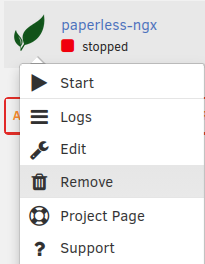

Now the container is gone and not listed in „Docker Copntainers“ anymore.
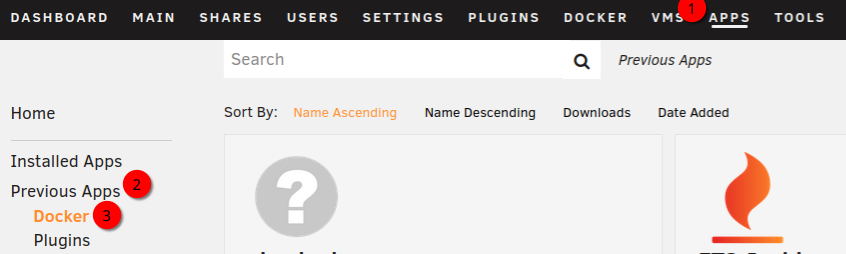
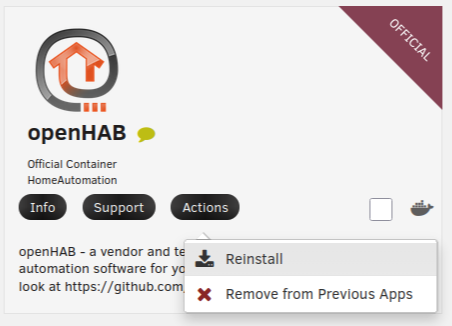
In the following „Add Conatiner“ dialog all previous settings should be filled right – so just hit „Apply“ at the bottom. You see pulling the image and running docker commands. After clicking „Done“ you can go back to „Docker“ and see the newly created and running conatiner in the list.
As you can see, all data and settings you need to run you container is in appdata and stays there even if the container is removed. So it’s no problem te delete and reinstall a defect container, And it’s alway a goof idea backup appdata 🙂 .